Reading · Beta
 Kobo 微捲動
讓 Kobo 網頁閱讀,跟上自己的節奏。

Kobo 微捲動 繁體中文
0.13.0 已送審,審查中;新版即將更新。
尚未確認核准或開放下載,不承諾審查完成日期。
讓 Kobo 網頁閱讀更順手,保留你喜歡的閱讀節奏。
Kobo 微捲動優先改善 Kobo Web Reader 的垂直捲動與選字劃線操作,並提供每本書各自記憶的閱讀排版。這是 mininote 製作的非官方外掛,與 Rakuten Kobo 無隸屬、合作或背書關係。
【更連續的捲動】
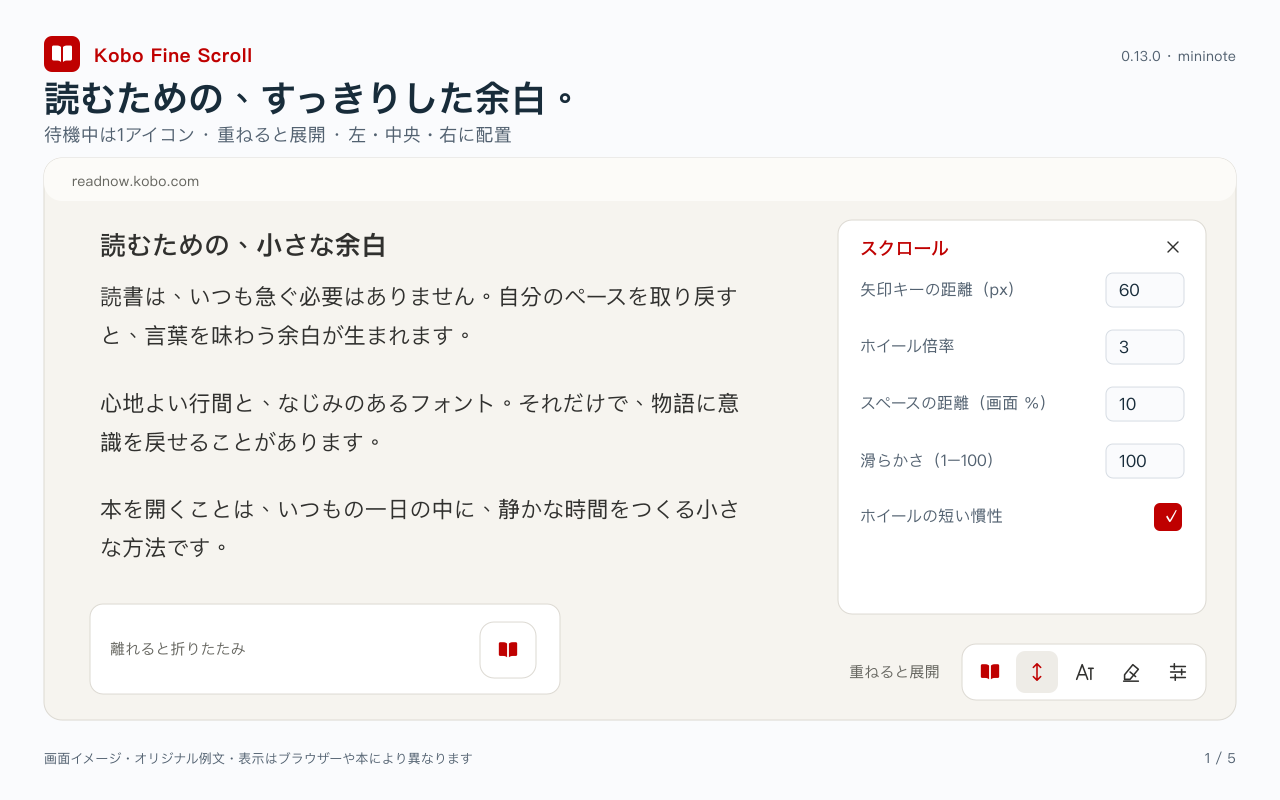
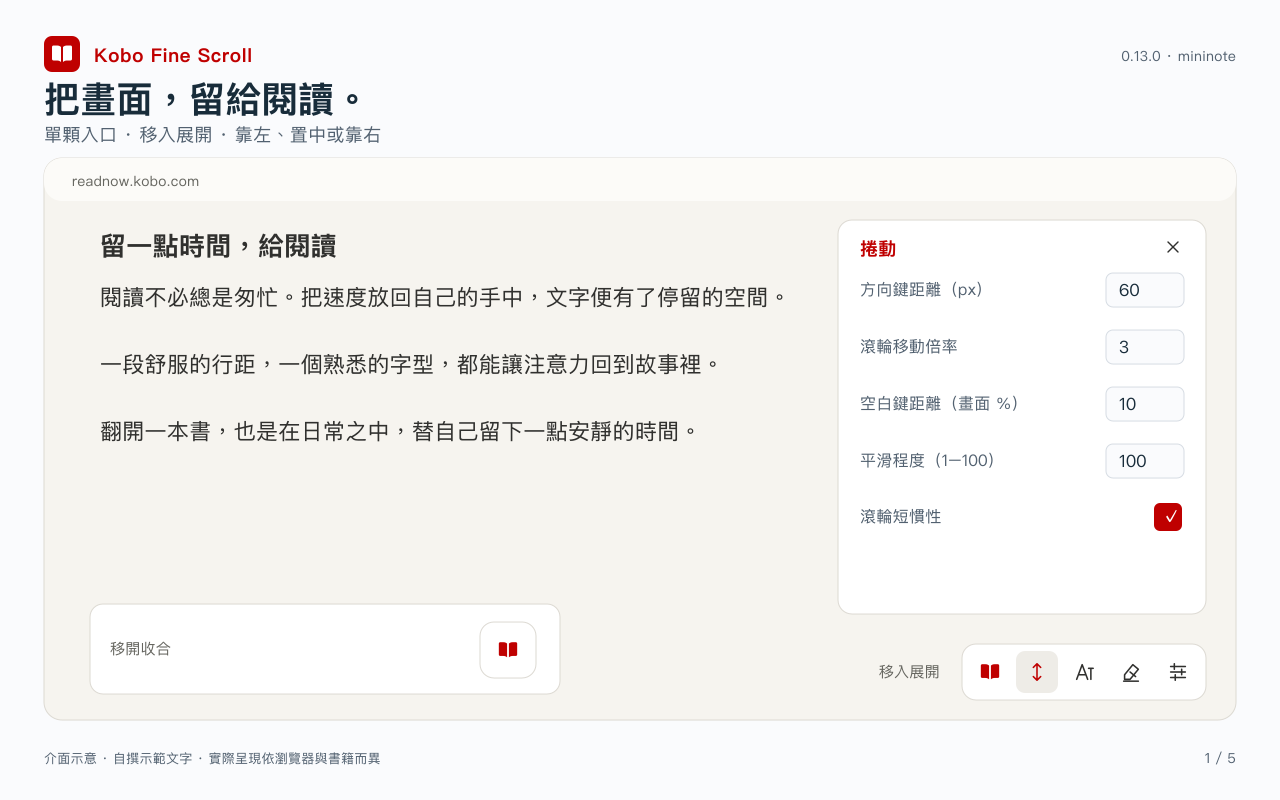
• 可調方向鍵距離、空白鍵移動比例與滾輪倍率。
• 方向鍵/空白鍵長按連續移動,放開停止;Shift+空白向上。
• 可切換觸控板/滑鼠模式,調整平滑程度,關閉或啟用短慣性。
• 保留原生拖曳與閱讀設定列操作;鍵盤操作可能受輸入法快捷鍵影響。
【選字、劃線與筆記】
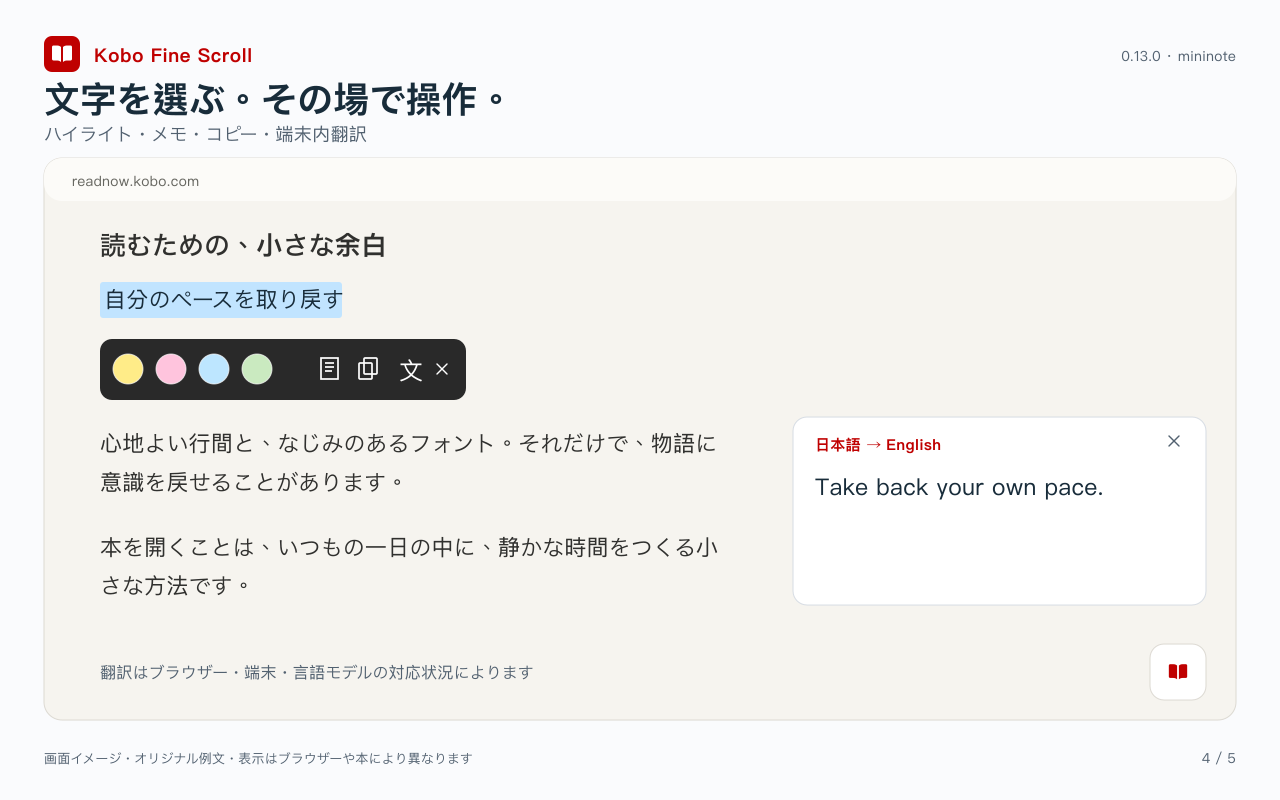
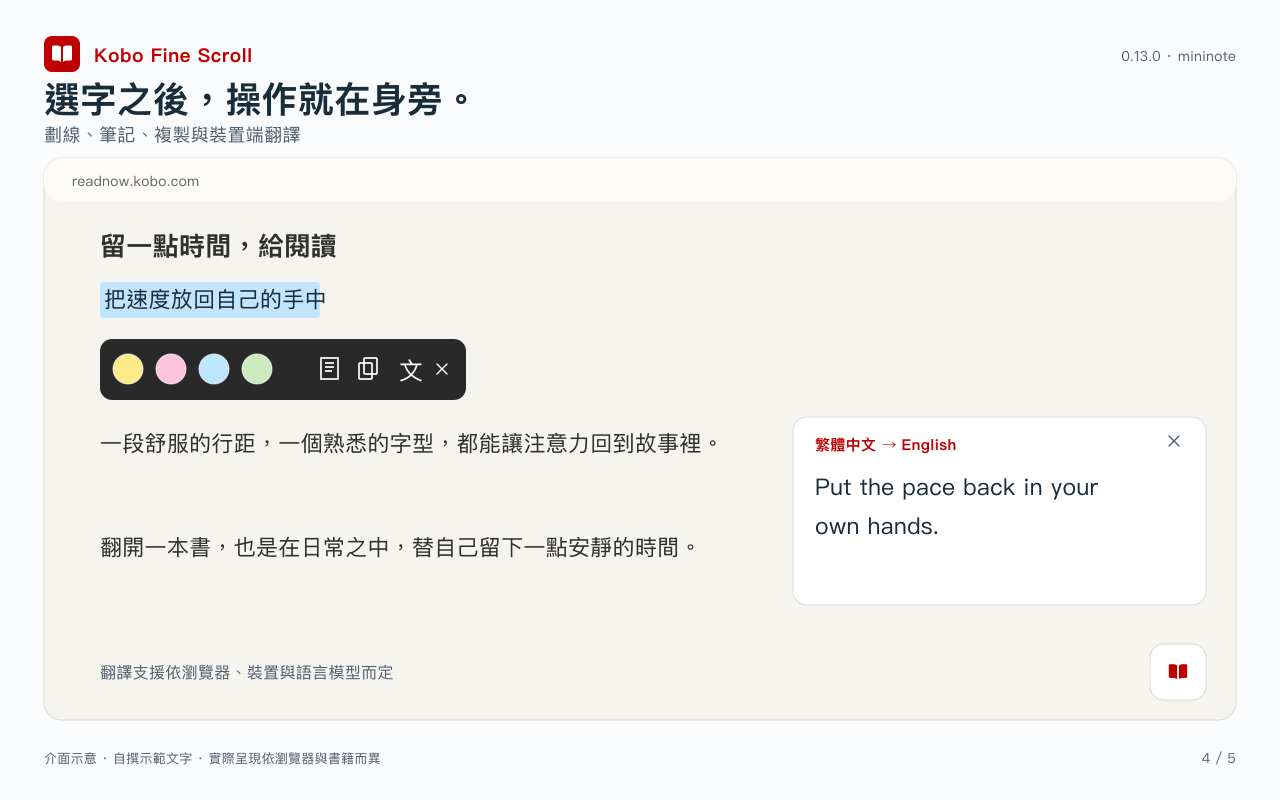
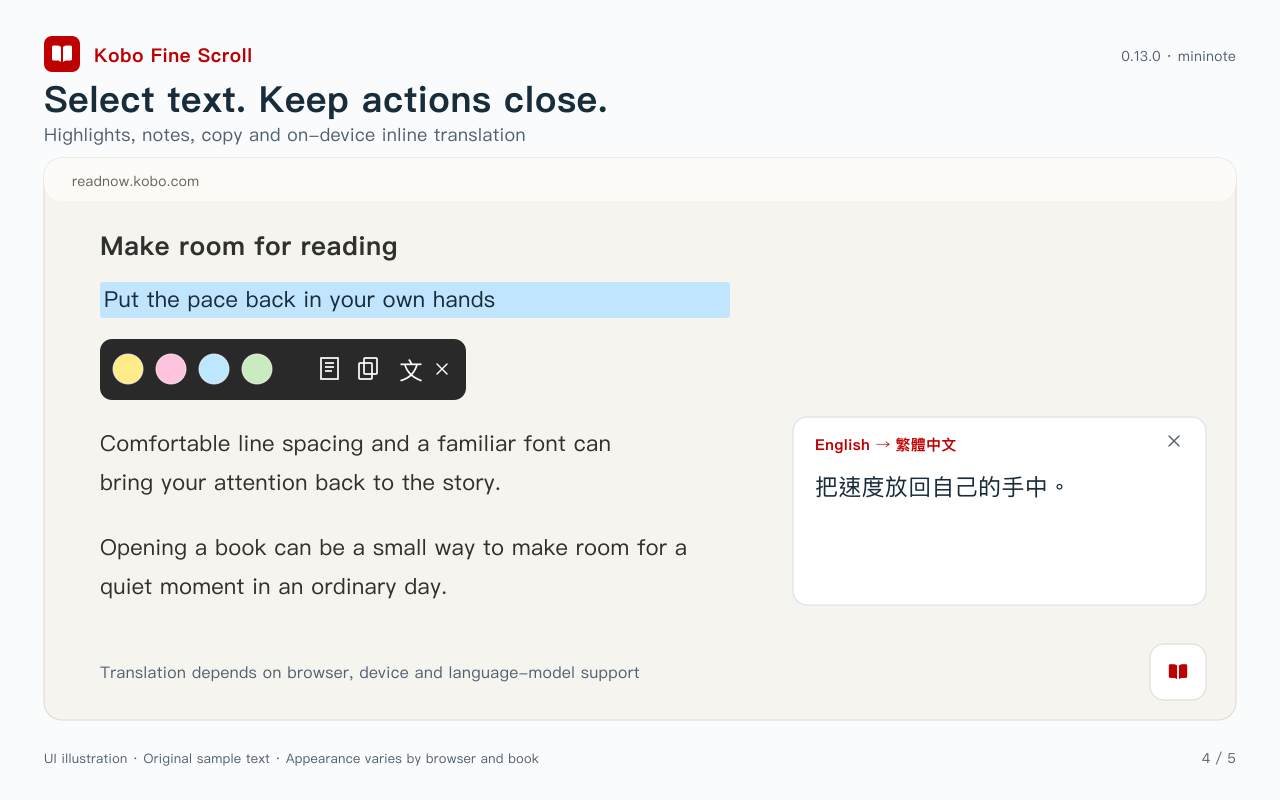
• 選字修復可開關並記憶狀態,拖曳選字後顯示精簡圖示工具列。
• 圓形色塊劃線、筆記、複製與翻譯;可設定劃線後直接結束,或繼續開啟筆記。
• 透過 Kobo 既有註記服務儲存及管理支援的劃線與筆記;操作仍受書籍與帳號的原有限制。
【每本書的排版與字型】
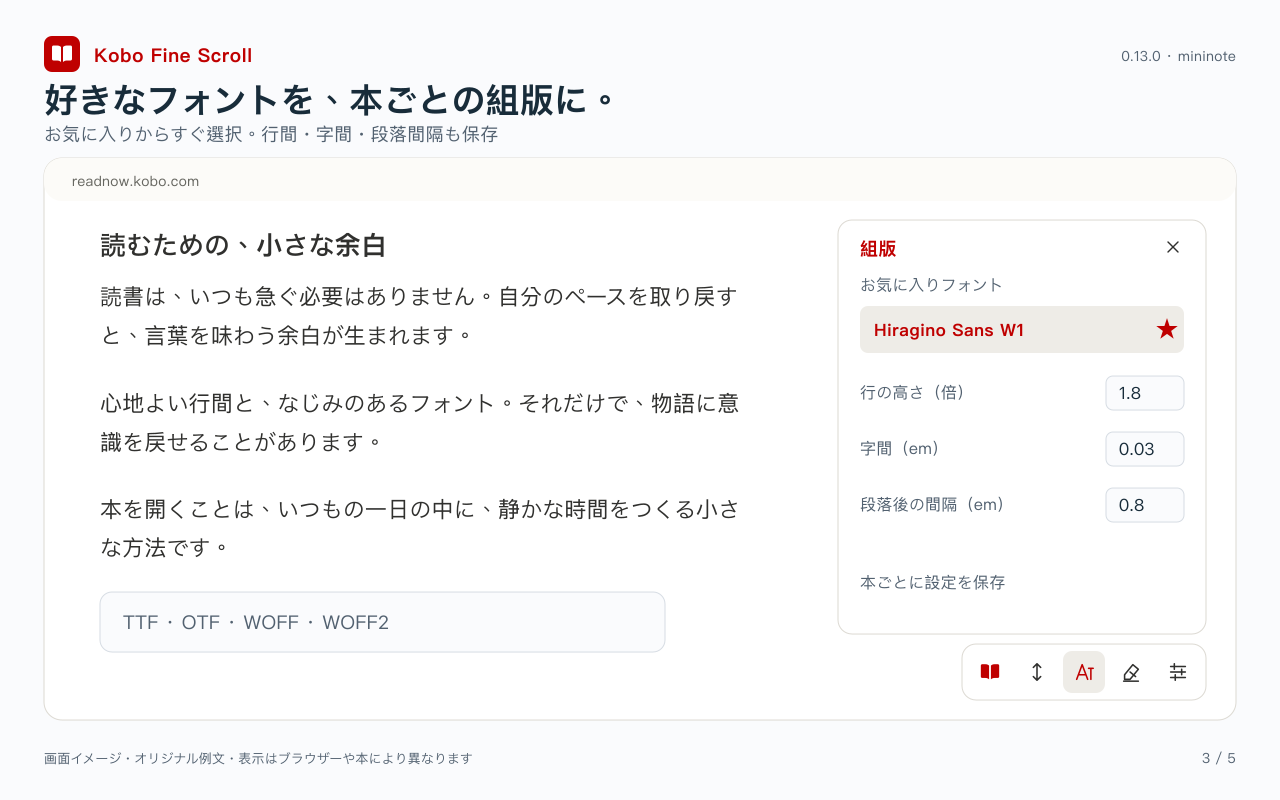
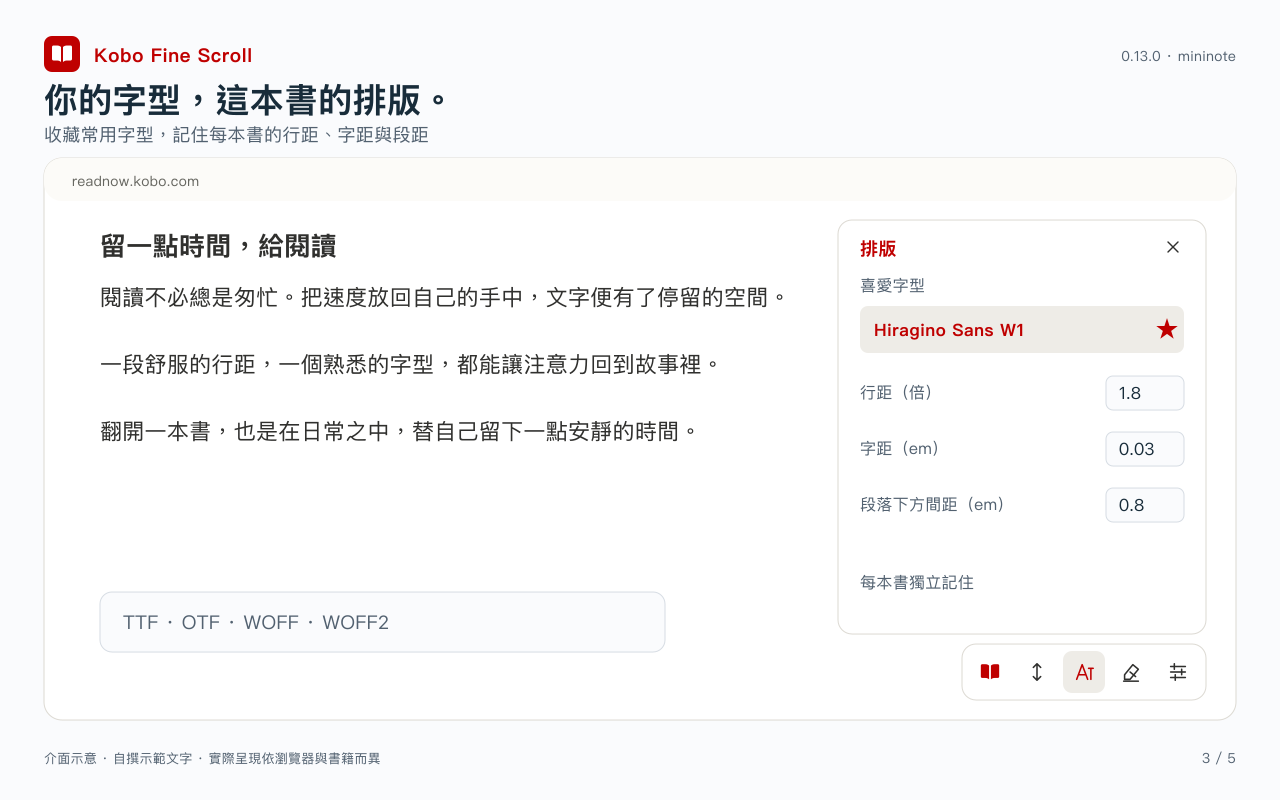
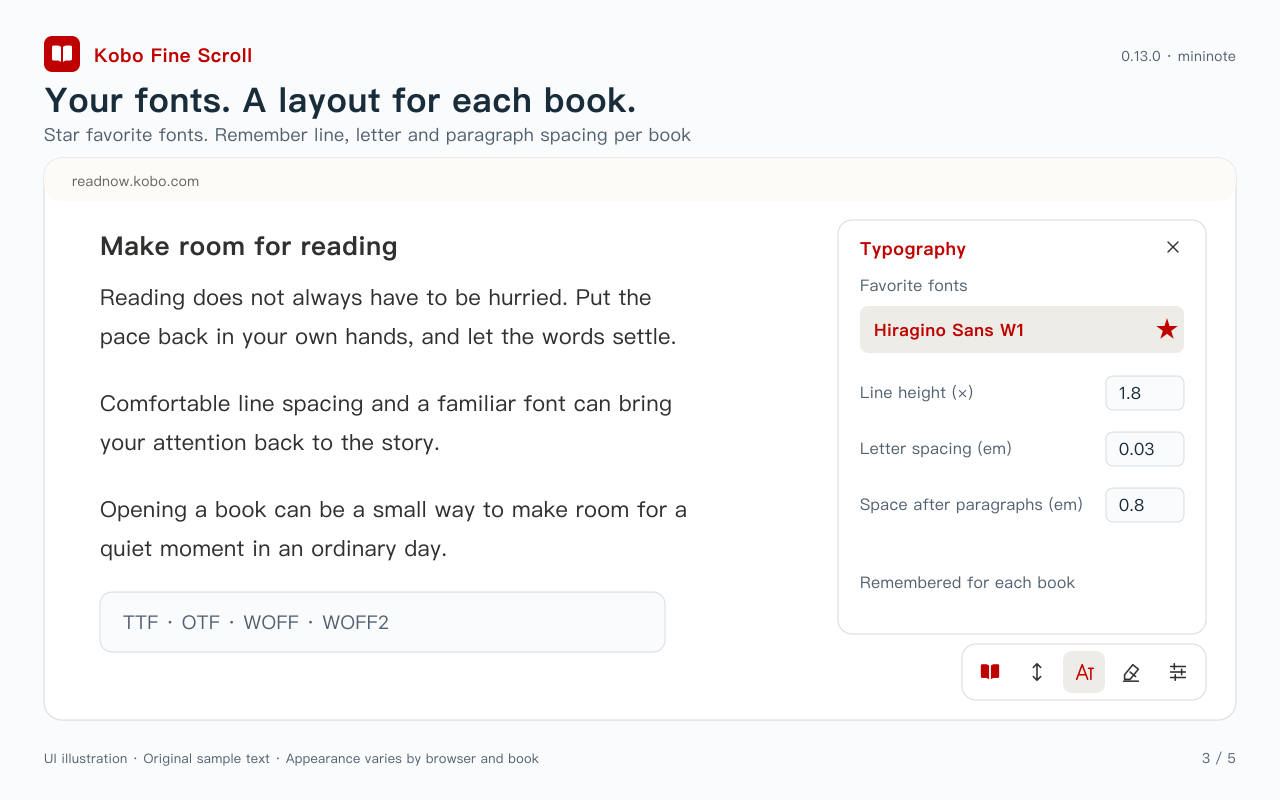
• 調整行距、字距、段落間距,為不同書保存不同排版。
• 支援從電腦字型清單選用字型,並以星號收藏常用字型;收藏後可直接快速選用。
• 也可自行匯入 TTF、OTF、WOFF 或 WOFF2,單檔上限 20 MB。字型須有合法使用權。
• 每本書的字型、排版、配色保存在此瀏覽器;可另設新書預設,不改變已設定的書。
【簡潔外觀】
• 底部工具列閒置時只保留一顆實心書本圖示,移入展開,移開且面板關閉後收合;也可點擊或用鍵盤操作。
• 工具列可靠左、置中、靠右,點書頁收合設定面板。
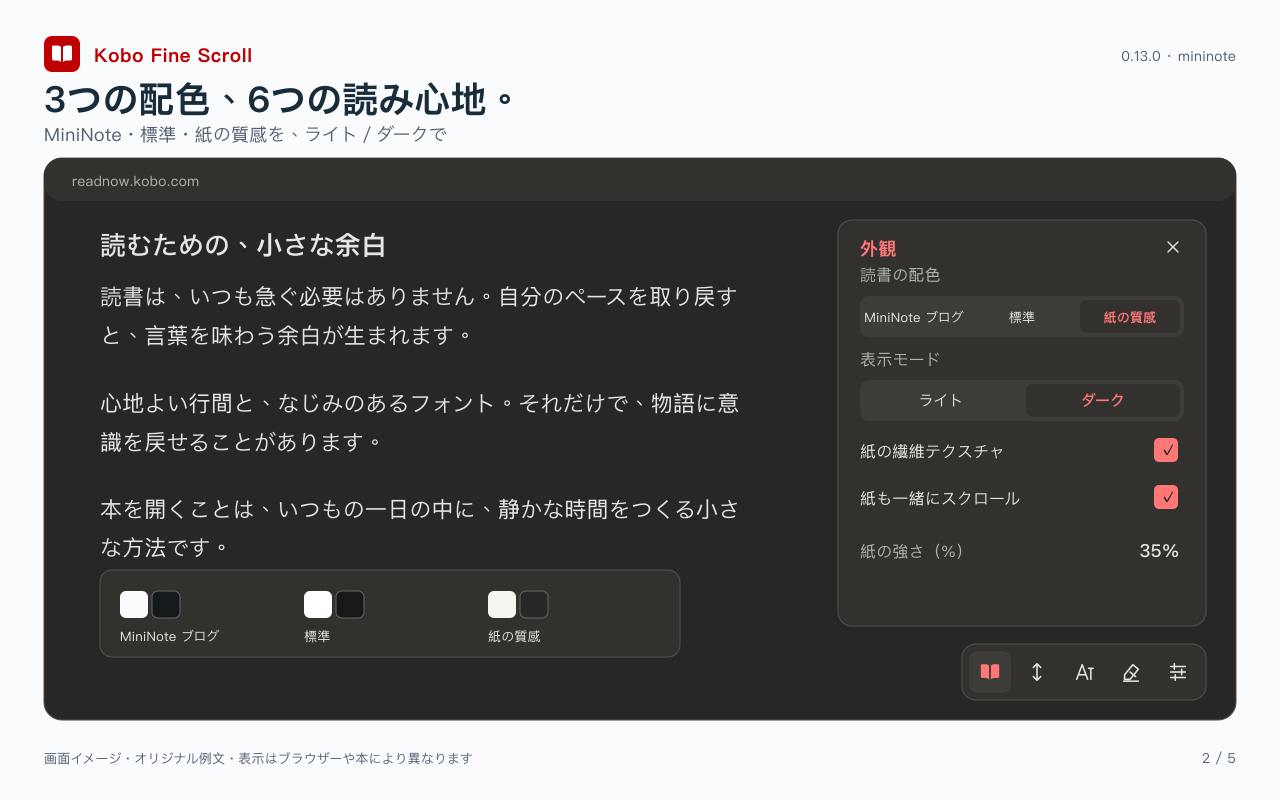
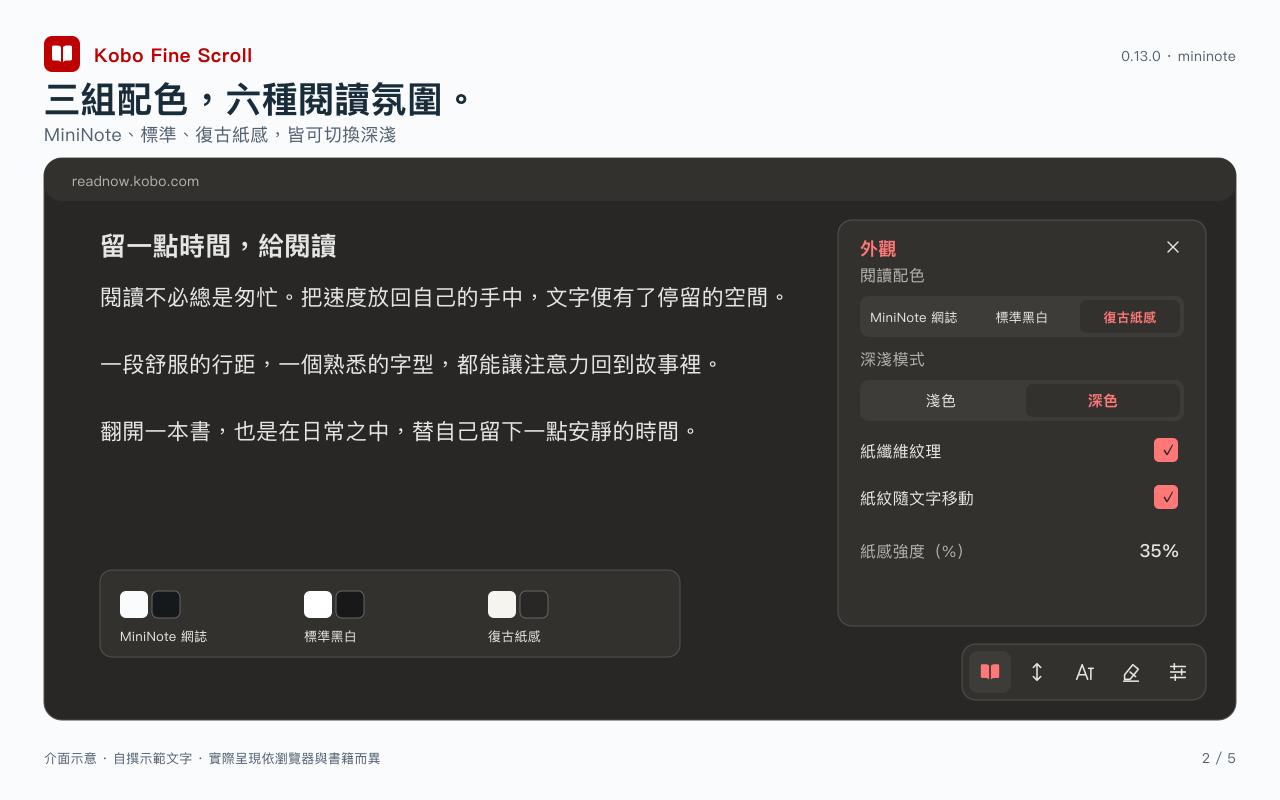
• MiniNote、標準黑白與復古紙感三組配色,各有深色/淺色;配色與紙面覆蓋整個閱讀區域。
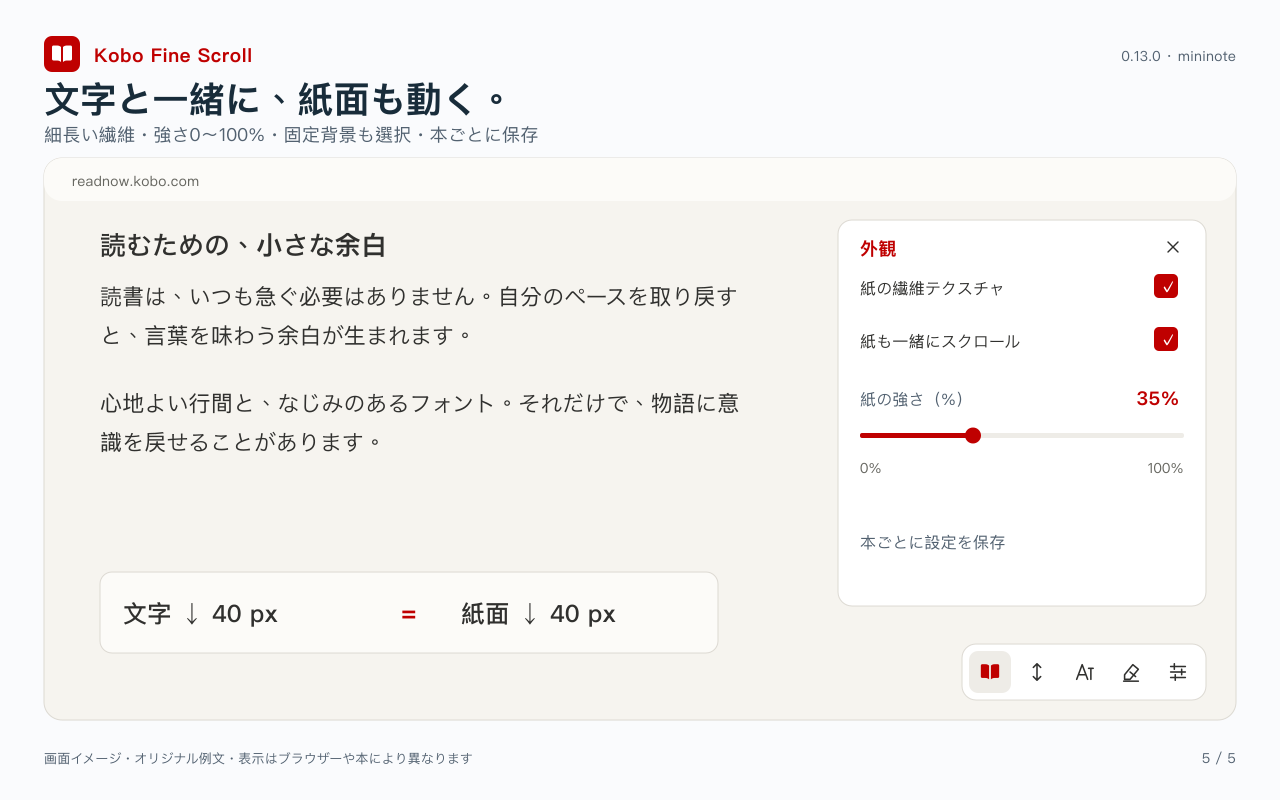
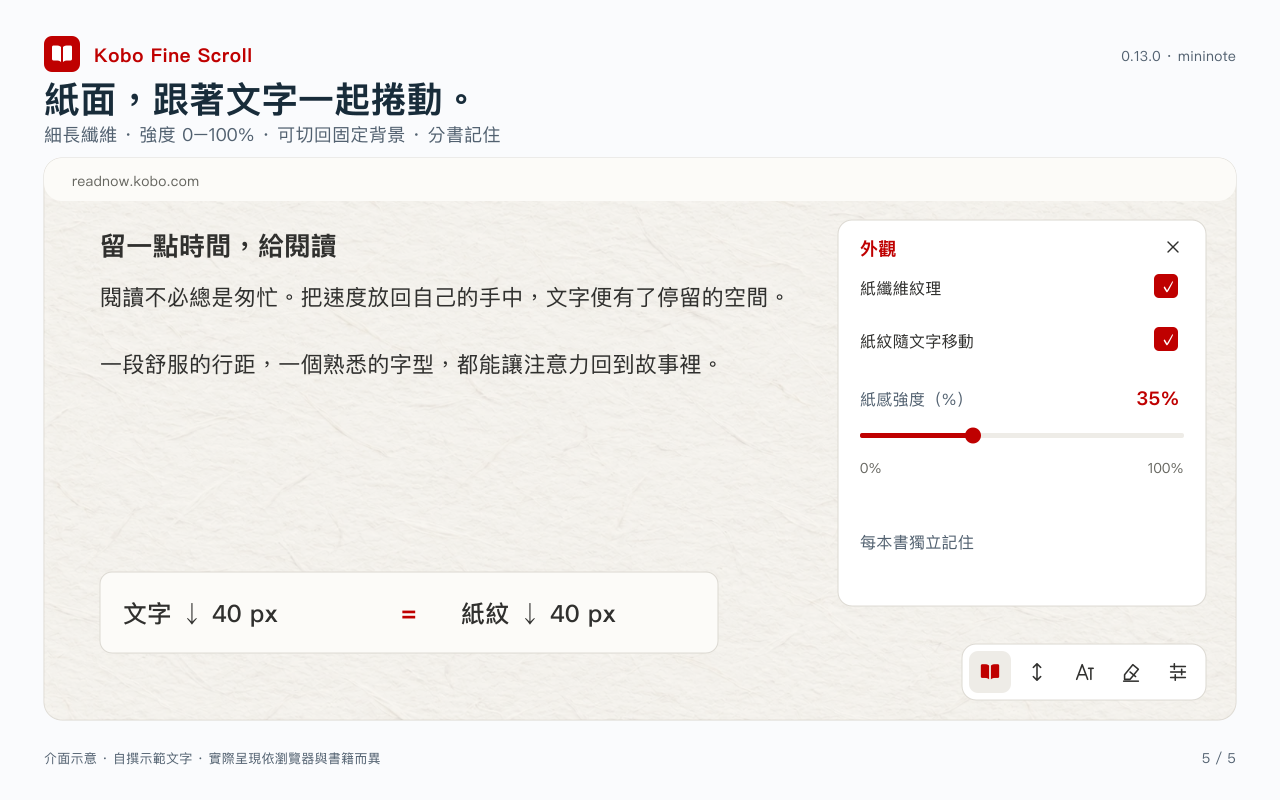
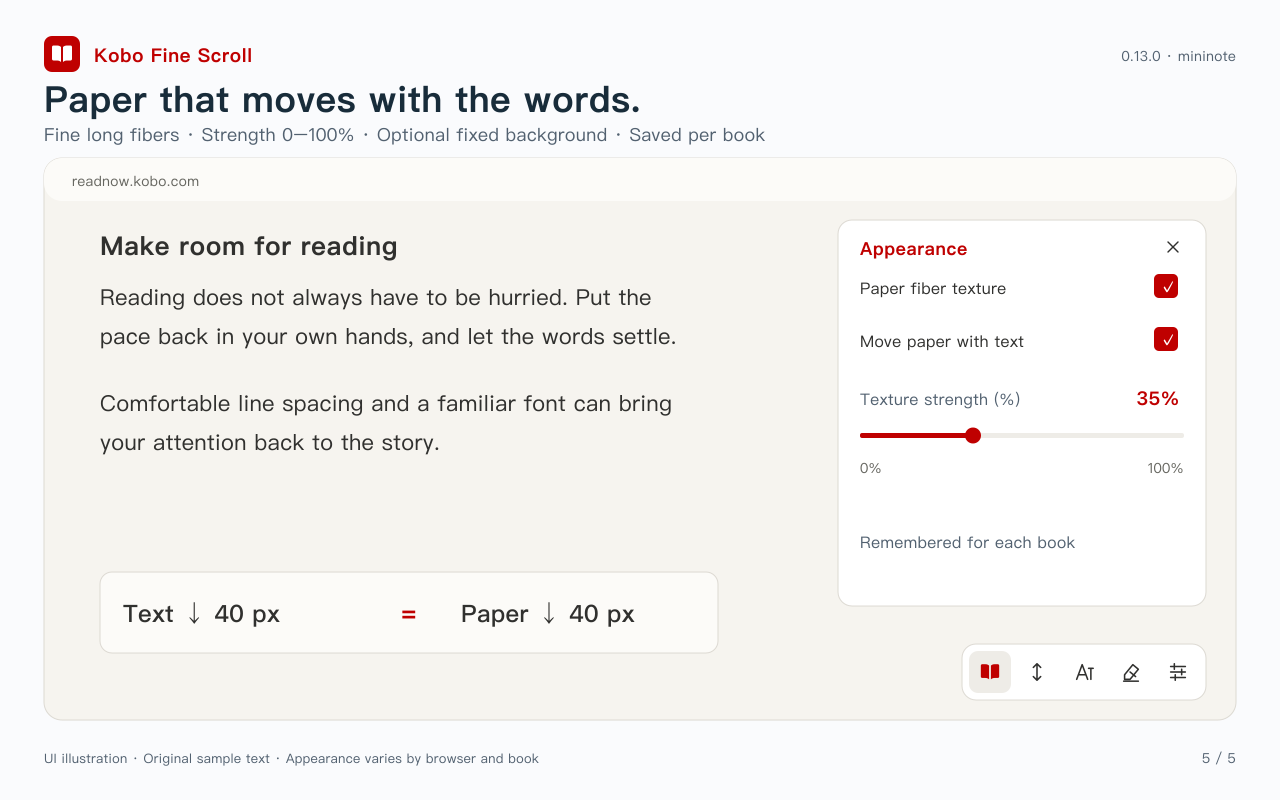
• 復古模式提供細長纖維紙材,強度可調 0–100%,預設 35%;也可關閉紋理、保留底色。
• 紙紋預設隨文字同向、等距捲動,也可切換為固定背景;強度與開關會隨每本書記住。
【中英日介面與翻譯】
• 介面提供繁體中文、English、日本語,同一個安裝包即可切換。
• 選字後可在書頁旁顯示裝置端翻譯;來源與目標語言獨立設定,提供繁中、英文、日文選項。
• 翻譯依瀏覽器、裝置與語言模型支援而定;首次可能需下載模型。不支援時會顯示狀態,不會自動改用雲端翻譯。
使用前請在 Kobo 原生閱讀設定啟用垂直捲動。自訂排版主要適用可重排文字書;固定版面、圖片型內容及部分書籍可能不適用。電腦字型清單需瀏覽器提供本機字型 API,並可能要求你授權。字型檔與偏好僅保存在此瀏覽器設定檔,不會自動同步其他電腦。
外掛僅作用於 readnow.kobo.com。沒有開發者後端、廣告或使用追蹤;你要求儲存的劃線/筆記由 Kobo 處理。這是依賴 Kobo 既有網頁介面的不公開測試版,網站更新可能影響相容性。
發布者:mininote
隱私說明:https://mininotelab.com/privacy/kobo-fine-scroll
功能介面示意
Kobo Fine Scroll English
0.13.0 submitted for store review. Update coming soon.
Approval and download availability are not confirmed. No review date is promised.
Make Kobo Web Reader more comfortable, at your preferred reading pace.
Kobo Fine Scroll focuses on better vertical scrolling and text selection/highlighting, with reading layouts remembered separately for each book. It is an independent extension by mininote, with no affiliation, partnership or endorsement from Rakuten Kobo.
CONTINUOUS SCROLLING
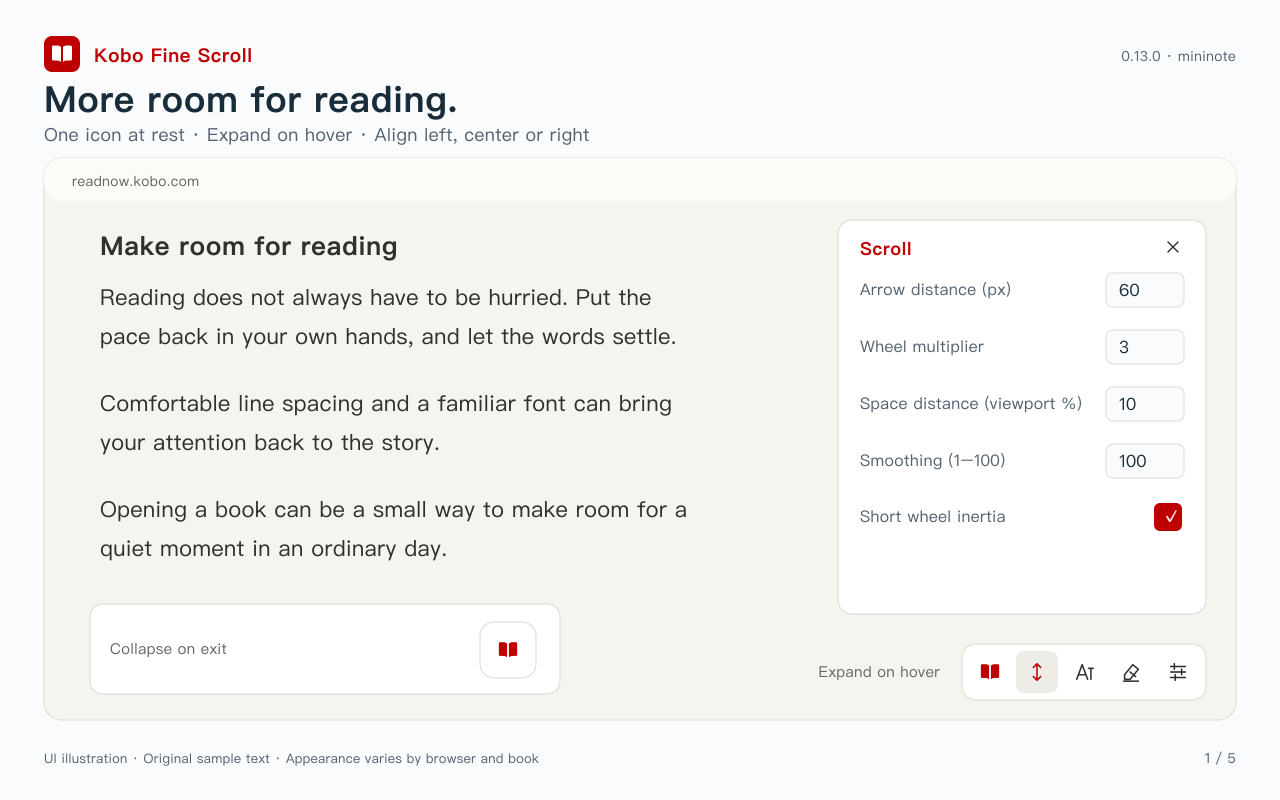
• Adjust arrow-key distance, Space-key movement and wheel multiplier.
• Hold arrows or Space for continuous movement; release to stop. Shift+Space moves upward.
• Choose trackpad or mouse mode, tune smoothing and enable or disable short wheel inertia.
• Keep native dragging and reader toolbar controls. Input-method shortcuts may affect keyboard operation.
SELECTION, HIGHLIGHTS AND NOTES
• A persistent, optional selection repair and compact icon toolbar after dragging to select text.
• Circular highlight colors, notes, copy and translation. Choose whether highlighting finishes immediately or opens the note editor.
• Save and manage supported annotations through Kobo's existing services. Book/account restrictions still apply.
PER-BOOK TYPOGRAPHY AND FONTS
• Adjust line height, letter spacing and paragraph spacing separately for each book.
• Choose an installed computer font, star favorite fonts and select them quickly from a favorites list.
• Alternatively import a TTF, OTF, WOFF or WOFF2 font, up to 20 MB per file. Use fonts you are licensed to use.
• Remember each book's font, layout and palette in this browser. New-book defaults leave existing book settings unchanged.
A QUIETER INTERFACE
• One solid book icon when idle. Move the pointer over it to expand; it collapses after leaving when the settings panel is closed. Click and keyboard access remain available.
• Place the bottom toolbar left, center or right. Click the book to close its settings panel.
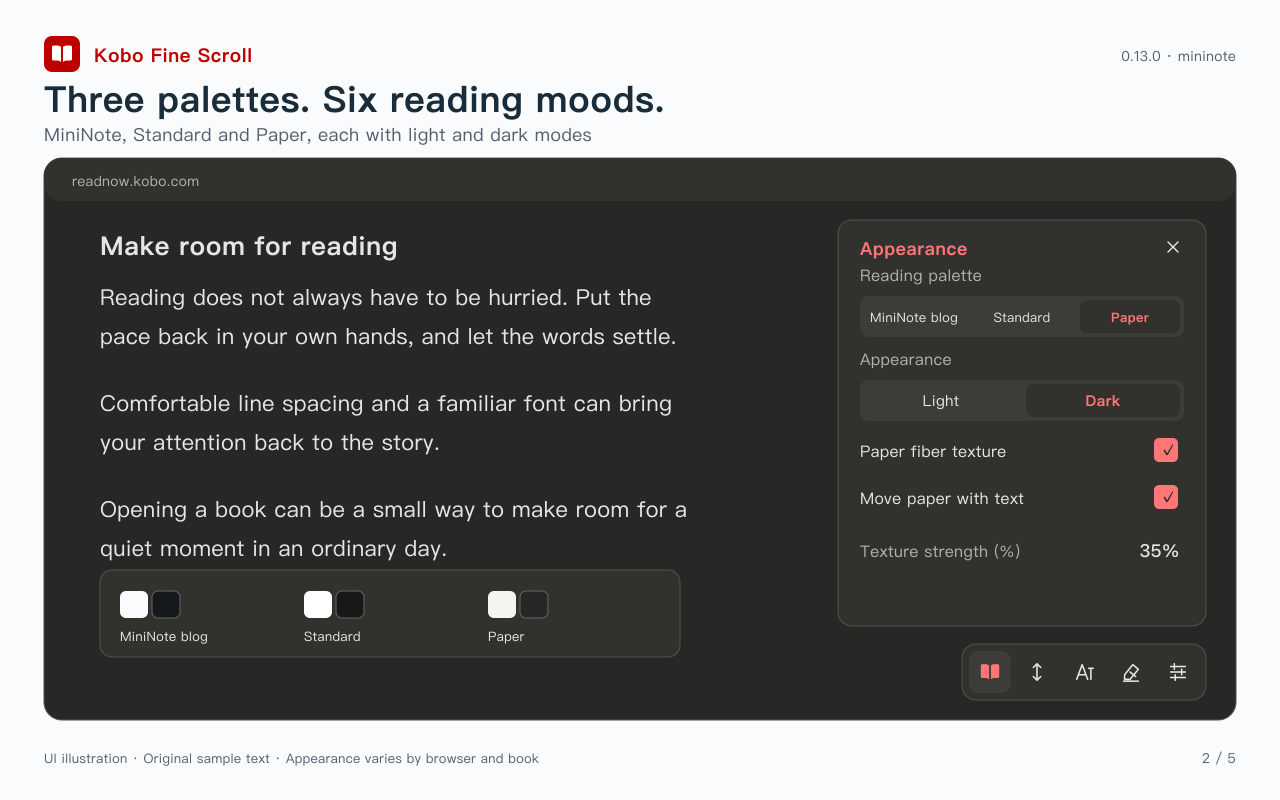
• MiniNote, Standard and Paper palettes, each with light/dark modes across the reading area.
• Fine long-fiber paper with adjustable strength from 0–100%, defaulting to 35%. Turn the texture off while keeping the palette.
• Paper moves in the same direction and at the same distance as the text by default. Switch to a fixed background if preferred. Each book remembers the strength and toggle.
LANGUAGES AND INLINE TRANSLATION
• Traditional Chinese, English and Japanese interface options in one package.
• User-initiated on-device translation beside the selection. Set source and target languages independently from the UI, with Traditional Chinese, English and Japanese options.
• Availability depends on the browser, device and language models. First use may download browser-managed models. Unsupported translation shows a status and never silently switches to a cloud service.
Enable vertical scrolling in Kobo's own reading settings first. Typography is intended for reflowable text books; fixed-layout or image-based pages and some titles may not support it. Listing installed fonts requires a browser Local Font Access API and may request permission. Preferences and imported fonts remain in this browser profile and do not automatically sync to other computers.
Only readnow.kobo.com is matched. No developer backend, ads or usage tracking. Requested highlight/note saves use Kobo's services. This unlisted beta relies on Kobo's existing webpage interfaces; website updates can affect compatibility.
Publisher: mininote
Privacy: https://mininotelab.com/privacy/kobo-fine-scroll
Contact and full privacy notice →
Feature illustrations
Kobo 微細スクロール 日本語
0.13.0 はストア審査に申請済みです。更新は近日予定です。
承認・ダウンロード提供は未確認です。審査完了日は保証しません。
Kobo Web Reader を、自分に合う読み心地に。
Kobo 微細スクロールは、縦スクロールと文字選択・ハイライト操作の改善を中心に、本ごとの組版設定を提供します。mininote による非公式の拡張機能であり、Rakuten Kobo との提携・協力・承認関係はありません。
【連続したスクロール】
・矢印キーの移動距離、スペースキーの移動割合、ホイール倍率を調整。
・矢印/スペースを押している間は連続移動し、離すと停止。Shift+スペースで上方向へ移動。
・トラックパッド/マウスを選択し、滑らかさと短い慣性を調整。
・標準のドラッグや読書ツールバーも利用できます。入力方式のショートカットがキー操作に影響する場合があります。
【文字選択・ハイライト・メモ】
・文字選択の修復はオン/オフを保存。ドラッグ選択後は簡潔なアイコンツールバーを表示。
・丸い色ボタン、メモ、コピー、翻訳。ハイライト後に終了するか、メモ入力を開くか選べます。
・対応する注釈は Kobo の既存サービス経由で保存・管理。本やアカウントの制限はそのまま適用されます。
【本ごとの組版とフォント】
・行の高さ、字間、段落後の間隔を調整し、本ごとに保存。
・パソコンのフォントから選択し、星でお気に入り登録。次回はお気に入りからすぐ選べます。
・TTF、OTF、WOFF、WOFF2 の読み込みにも対応。1ファイル最大20 MB。利用権のあるフォントを使用してください。
・本ごとのフォント、組版、配色をこのブラウザーに保存。新しい本の初期設定を変更しても、既存の本の設定は変わりません。
【すっきりした表示】
・待機中は塗りつぶしの本アイコン1個だけを表示。ポインターを重ねると展開し、設定パネルが閉じた状態で離れると折りたたみます。クリックやキーボード操作も可能です。
・下部ツールバーは左・中央・右に配置。本のページをクリックすると設定パネルを閉じます。
・MiniNote、標準、紙の質感の3種類にライト/ダークを用意。読書領域全体に配色と紙面を適用。
・細く長い繊維の紙テクスチャは0〜100%で調整でき、初期値は35%。質感を消して配色だけ残すこともできます。
・初期設定では紙の質感が文字と同じ方向・距離でスクロールします。固定背景にも切り替え可能。強さと切り替えは本ごとに保存します。
【3言語の画面と翻訳】
・繁体字中国語、英語、日本語の画面を1つのパッケージで切り替え。
・選択文字のそばに端末内翻訳を表示。原文/翻訳先は画面言語と独立して設定でき、繁体字中国語・英語・日本語の選択肢があります。
・翻訳はブラウザー、端末、言語モデルの対応状況に依存します。初回はブラウザー管理のモデルを取得する場合があります。利用できない場合は状態を表示し、クラウド翻訳へ自動切り替えはしません。
最初に Kobo の読書設定で縦スクロールを有効にしてください。組版は主にリフロー形式の文字中心の本向けです。固定レイアウト、画像中心のページ、一部の本では対応できません。フォント一覧には Local Font Access API と許可が必要な場合があります。設定と読み込んだフォントはこのブラウザープロファイルだけに保存され、別のパソコンへ自動同期しません。
動作対象は readnow.kobo.com のみ。開発者のサーバー、広告、利用追跡はありません。利用者が要求したハイライト/メモの保存は Kobo が処理します。Kobo の既存画面に依存する限定公開ベータ版のため、サイト更新によって互換性が変わる場合があります。
公開元:mininote
プライバシー:https://mininotelab.com/privacy/kobo-fine-scroll
機能の画面イメージ